Glitter Wallpapers For Girls
- 4.8
- Rating
- 1.00M
- Installs
- Free
- Price
 Analysis by App-foxy
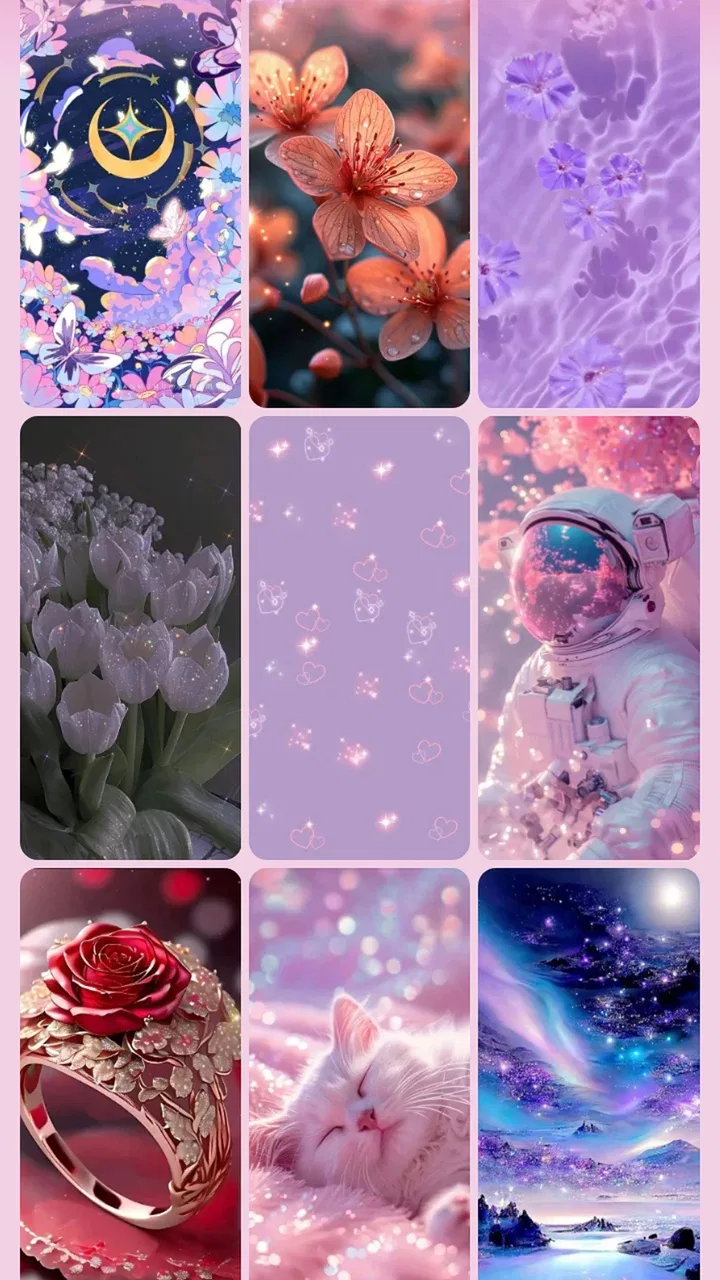
I noticed Glitter Wallpapers For Girls because it aims at a very specific kind of screen makeover: bright, decorative backgrounds with glitter, sparkle, and cute visual styling. After spending time with it, my first impression was easy to understand. It is not trying to be a complete phone-customization suite or a productivity tool disguised as personalization. Its appeal is much narrower and more direct: it gives an ordinary screen a playful, glossy look with very little effort.
That focus is both its strongest quality and its main limitation. If you enjoy colorful wallpapers and like changing the mood of your phone regularly, this app can be a pleasant source of inspiration. If you prefer restrained photography, minimalist gradients, or a single carefully chosen background that stays in place for months, the glitter-heavy direction may feel repetitive quickly. My overall experience was positive, but I found its lasting value depends less on the initial visual impact and more on whether you actually enjoy maintaining a changing homescreen.
What the first week feels like
The first few sessions are the most immediately rewarding. The app belongs to the personalization category, and its presentation is built around making the phone feel more personal without requiring design skills. Instead of searching through general image collections and then wondering whether a picture will work behind icons, I could start with a style that already understands the intended result: a decorative, feminine, sparkling background.
You May Also Like

 Blood Strike: 2.5 Anniversary
Blood Strike’s Loadouts Turn Every Drop Into a Tactical Gamble
A close look at Blood Strike’s custom loadouts: how fast access to signature weapons reshapes its battle royale rhythm, rewards preparation, and narrows the gap between fights.

 Pandora - Music & Podcasts
Pandora’s Music Is Easy to Start, but Harder to Recover
Pandora’s strength is its low-effort path from a seed to a station. Its weak spot is how much confidence it asks you to place in connection, setup, and quiet recovery.

 8 Ball Pool
 Is Built on Rivalries, Rematches, and Routine
A close look at the rivalries, rematches, shared routines, and unanswered safety questions that turn a quick pool match into a persistent mobile community.

 Samsung Music
’s Quiet Strength Is Playing What You Already Own
Its reach comes less from spectacle than from dependable access to a personal library. That simplicity is both the app’s strongest retention engine and its ceiling.

 AccuWeather: Weather Radar
AccuWeather Review: A Quick, Clear Forecast for Everyday Decisions
For everyday plans, the best forecast is the one you can understand quickly. AccuWeather makes rain timing, radar, and local conditions easy to act on, with a few trade-offs.

 Hill Climb Racing
Why Hill Climb Racing Still Turns Crashes Into One More Run
A tiny car, a bumpy hill and one more upgrade: Hill Climb Racing keeps resurfacing because its simple chaos makes every near-miss feel personal.
More From Our News Desk



That makes it especially approachable for someone who wants a visible change but does not want to spend time editing images. A new user can browse by mood rather than by technical criteria. The useful question is not “Which image has the best resolution?” but “Do I want something soft, bright, glamorous, cute, or more energetic today?” That kind of browsing is simple, and it suits the app’s narrow purpose.
I also think the visual direction works well for younger users and anyone who treats a phone as an accessory rather than a neutral tool. The Everyone age rating makes the app broadly accessible, while the style itself is clearly aimed at people who like decorative screens. Parents choosing a harmless personalization option for a child or teenager may appreciate that the experience is centered on backgrounds rather than complicated social interaction.
The first-week appeal comes from contrast. A plain default wallpaper can make a phone feel unfinished, especially after buying a new device or changing a case. A glitter background immediately adds personality. I found that the effect was strongest when the rest of the homescreen was fairly simple. Too many bright icons, widgets, or colorful folders can compete with the background, while a cleaner layout lets the sparkle remain visible.
One practical tip I would give a new user is to judge a wallpaper with the icons visible, not only in the preview. A background that looks attractive on its own may make app labels difficult to read once it sits behind a busy grid. The more detailed glitter patterns can also create visual noise in the center of the screen. I got better results by choosing designs with calmer areas where icons and clock widgets would sit.
This is one of the app’s less obvious trade-offs. The most dramatic wallpaper is not always the most usable one. A highly reflective or densely patterned image can look exciting during selection but become tiring when it is viewed every time you unlock the phone. For everyday use, I preferred designs that kept the sparkle around the edges or used a softer central area.
The developer behind the app is o16i Apps, and the product has clearly been shaped around quick visual gratification rather than deep customization. That is not a criticism by itself. In fact, it explains why the app is easy to understand. I did not need to learn a complicated editor, build a palette, or create a theme from separate pieces before seeing a result.
Still, users should set their expectations correctly. This is a wallpaper-focused experience, not a replacement for a launcher, icon-pack manager, or full theme system. It can change the visual foundation of the phone, but the rest of the interface remains dependent on the phone’s own settings and whatever other customization tools are installed. If your goal is a completely coordinated homescreen, you may need additional tools.
The app is free to install, which makes trying it low-risk. There are also optional in-app purchases ranging from less than a dollar to amounts close to one hundred dollars per item. That wide range is important to keep in mind before treating every attractive item as an impulse purchase. I would begin with the free experience, decide whether the style genuinely fits my daily use, and only then consider paying for something I expect to keep.
In the first week, I would also recommend testing a background during different lighting conditions. Glitter effects can look charming in a bright room but feel too intense at night, particularly if the phone is already set to a high brightness level. A wallpaper that works well during the day may need to be replaced with a calmer choice for evening use. This is where the app feels more like a wardrobe than a permanent renovation.
Where the novelty is genuinely useful
The strongest early use case is a small reset. I can imagine installing the app after getting bored with a familiar homescreen, choosing a new background before a trip, or matching the phone to a favorite color for a special occasion. It is also useful when a device feels visually dull but the owner does not want to redesign everything.
Another realistic scenario is a teenager who changes the appearance of a phone along with seasonal interests. Rather than searching random image sites, the user can stay within a collection built around cute and glitter-oriented visuals. That saves time and keeps the result visually consistent with the intended theme.
However, I would not recommend it to someone who mainly uses a phone for reading, navigation, work, or accessibility-focused clarity. A decorative background can interfere with the sense of order those users want. For them, a plain color, a dark gradient, or a personal photograph with generous empty space would probably remain more useful over time.
What remains after the first month
The important question is whether the app still earns space after the initial excitement fades. My answer is conditional: it can, but only for users who enjoy rotation. The average rating of 4.8 from around seventeen thousand ratings suggests that the visual concept resonates strongly with many people, and the app has passed one million installs. Those figures indicate broad interest, but they do not guarantee that every user will keep returning once the first wallpaper has been chosen.
For me, the recurring value came from treating the app as a source of periodic refreshes rather than as something that needed to be opened every day. I got more from it when I used it occasionally, after the current background had started to feel stale. That spacing helped preserve the sense of discovery. Opening a wallpaper app too frequently can make every option feel interchangeable.
A useful monthly routine would be to choose one background at the beginning of the month, live with it for several days, and then decide whether it deserves to stay. This prevents constant switching and makes it easier to notice what actually works behind the icons. I found that keeping a small personal shortlist of styles was more satisfying than changing the screen whenever I saw something bright.
The app’s long-term usefulness also depends on how much visual variety you personally need. Someone who likes glitter but has a strict favorite color may find enough value in a handful of backgrounds. Someone who expects a completely new visual language every week may become disappointed, especially if the central design idea remains the same. The concept has a recognizable identity, but that identity naturally narrows the range of experiences.
This is where it compares differently with the usual alternatives. General wallpaper apps usually offer a much wider mix, including landscapes, illustrations, abstract art, live backgrounds, and photography. They are better for users who want to explore many visual categories. Phone manufacturers’ built-in wallpaper tools are often better for low-maintenance use because they are already integrated into the device and tend to emphasize readability.
On the other hand, broad wallpaper services can feel overwhelming. I have spent more time searching through unrelated images than actually choosing one. Glitter Wallpapers For Girls is more efficient when I already know the mood I want. Its narrower selection is a benefit when the target style is exactly cute, sparkly, and decorative.
It also differs from a full launcher or icon theme. A launcher can change layout behavior, gestures, folders, and other parts of the homescreen, while an icon pack can coordinate the symbols themselves. This app is simpler. That simplicity makes it easier to use, but it also means the wallpaper may clash with icons that were designed for another visual style.
One of my preferred workflows was to choose a background first, then reduce unnecessary widgets and move the most frequently used icons into a less crowded arrangement. That small adjustment made the wallpaper feel intentional rather than pasted behind an unchanged screen. It is a practical way to get more value without needing a separate customization package.
Version 5.1.0 is the current version, and the app supports devices running Android 8.0 or later. That minimum requirement is reasonable for many existing phones, but anyone using an older device should check compatibility before becoming attached to the idea. I also would not assume that an older phone will present every decorative image with the same visual smoothness as a newer one; the overall experience can depend on the device as well as the app.
The maintenance burden is small, but not zero
Wallpaper apps often look effortless because the main action is simple, yet there is still a small maintenance cost. Every background has to be judged against icon placement, text readability, brightness, and personal fatigue. If I change the wallpaper too often, the phone starts to feel unsettled rather than refreshed.
My advice is to avoid choosing only from the preview thumbnails. Open the image at full size, imagine it behind the actual homescreen, and look for areas where labels may disappear. If the design is very bright, a dark icon style or a simpler layout may help, but those adjustments are not always available through the wallpaper app itself. This is one reason the product is best viewed as one layer of personalization, not a complete solution.
Storage and organization can become another minor concern for enthusiastic users. Saving many similar backgrounds makes it harder to remember which ones worked well. I found it more useful to keep a small rotation and remove choices that looked attractive in the catalog but failed in daily use. The best wallpaper is the one that remains pleasant after hundreds of unlocks, not the one that wins a quick glance.
There is also a financial maintenance question. Because the app is free but includes optional purchases, I would be careful about buying several items during the first burst of excitement. A low-cost purchase can feel reasonable, but repeated small decisions can add up, and the higher-priced items deserve especially deliberate consideration. I would pay only for a design I had already tested mentally against my actual phone layout.
The app is suitable for Everyone, which makes it approachable, but suitability is not the same as universal preference. Younger users may enjoy the bright style immediately, while adults looking for a polished professional device may find it too playful for work. A glitter background can be perfectly acceptable on a personal phone and distracting on a device used for client meetings or formal presentations.
Why the sparkle can become tiring
The biggest long-term risk is visual fatigue. Glitter is designed to attract attention, and that is exactly why it can lose its charm when seen repeatedly. At first, the shine feels lively. After weeks of looking at it, the same intensity may make the homescreen feel busy every time I check a notification.
Color repetition can cause the same problem. If most of the available choices revolve around similar pink, pastel, or glossy treatments, the app may stop feeling exploratory. This does not make the wallpapers poor; it simply means the product serves a particular taste rather than every possible taste.
There is also a difference between liking a style in isolation and living with it. A decorative wallpaper may look perfect in a screenshot but compete with a weather widget, calendar, or many app icons. Users who depend on a dense homescreen should be more selective than users who keep only a few shortcuts on the first page.
I would skip this app if I wanted live motion, interactive effects, or a system-wide transformation. I would also skip it if I disliked changing backgrounds or if I had already found a personal photo that felt meaningful and readable. In those cases, a general wallpaper collection, a plain built-in background, or a full customization tool would probably offer better lasting value.
Privacy-conscious users may also prefer to review the app’s current permissions and store details before installing, as they should with any personalization app. I do not treat a wallpaper tool as automatically risk-free simply because its purpose is visual. The sensible approach is to install it from the official app marketplace, check what the phone requests, and avoid granting access that does not make sense for the task.
My long-term verdict
After the novelty fades, I still see a place for this app, but it is a specific place. It works best as a lightweight decorating tool for people who genuinely like cute, sparkling backgrounds and want an easy way to refresh a phone. It is not the right choice for someone seeking a complete theme engine, a highly varied art library, or a background that disappears quietly behind the interface.
I appreciate that the app makes its purpose obvious. The developer, o16i Apps, has not tried to turn a focused wallpaper experience into something unnecessarily complicated. The free entry point makes experimentation easy, and the broad age rating means the style can suit a wide range of personal devices. The strong user response and large install base also show that the concept has found an audience.
My recommendation is to approach it as a rotation library, not a permanent installation you must interact with constantly. Choose backgrounds based on how they perform behind your icons, keep the calmer designs for everyday use, and reserve the most intense glitter styles for moments when you actually want the screen to stand out. That simple habit reduces fatigue and makes each change feel more worthwhile.
The app earns lasting space on my phone only when I want a playful visual reset. It does not replace the built-in wallpaper picker, a photo gallery, or a full launcher, but it offers a more focused answer when those alternatives feel too broad or too plain. The real value is not the first sparkle; it is finding a small set of backgrounds that remain comfortable after the excitement wears off.
So, if your ideal homescreen is colorful, cute, and visibly decorative, I think it is worth trying. Start free, test a few styles in your real icon layout, and resist buying more until you know what you will actually keep. If your priority is minimalism, professional restraint, or a one-time setup with no maintenance, choose a simpler alternative instead. For the right user, this is an enjoyable personalization app; for everyone else, the narrow style may become tiring before the month is over.
FAQs for Glitter Wallpapers For Girls
01What features does Glitter Wallpapers For Girls offer?
Glitter Wallpapers For Girls provides a wide selection of high-quality wallpapers with glitter effects, perfect for personalizing your device. The app includes categories such as unicorns, mermaids, and more. Users can easily browse, select, and set wallpapers directly from the app, ensuring a seamless customization experience.
02Is the Glitter Wallpapers For Girls app free to download and use?
Yes, the Glitter Wallpapers For Girls app is free to download from both the Google Play Store and the Apple App Store. While many wallpapers are available for free, there may be premium options that require in-app purchases to access additional content or remove ads.
03Does Glitter Wallpapers For Girls require an internet connection to use?
An internet connection is required to download new wallpapers from the app. However, once wallpapers are downloaded and set on your device, they can be accessed offline. This feature allows users to enjoy their chosen wallpapers without needing continuous internet access.
04Are there any age restrictions for using Glitter Wallpapers For Girls?
The app is designed to be kid-friendly and suitable for all ages. Nonetheless, it’s always a good idea for parents to supervise app downloads and usage, especially if in-app purchases are available, to ensure a safe and enjoyable experience for younger users.
05How can I set a wallpaper from the app on my device?
Setting a wallpaper from Glitter Wallpapers For Girls is simple. Browse through the categories, select your favorite wallpaper, and tap the 'Set as Wallpaper' option. The app guides you through the process, allowing you to quickly and easily personalize your home or lock screen.
Pros
- Wide variety of vibrant wallpapers.
- Easy to navigate user interface.
- High-resolution images for clarity.
- Regular updates with new designs.
- Free download with optional premium.
Cons
- Contains frequent ads during use.
- Limited customization options.
- Some wallpapers require premium.
- No offline access to wallpapers.
- May drain battery with high usage.

Glitter Wallpapers For Girls
Gallery